Menu

Build a Cross-Platform PCIe Driver for Windows, Linux, and macOS on x64 and ARM64

Your PCIe device is running on Windows x64. The next customer needs Linux support, while another deployment targets an ARM64 embedded platform.

The hardware interface remains the same, but a native driver implementation is tied to the operating system’s driver infrastructure. Supporting another OS can therefore introduce a separate implementation for resource mapping, DMA, interrupts, device lifecycle, and deployment.

For hardware expected to support multiple platforms, the architectural question is where to place that OS-specific layer and how much of the device-facing code can remain portable.

The cross-platform challenge

The device-specific logic stays largely the same across host OSes:

  • Register access: register definitions, BAR offsets, initialization and control sequences
  • DMA: engine programming, descriptor formats, ring management
  • Interrupts: status, acknowledgment, and device-specific handling
  • Application logic: device behavior and processing

What changes is the platform-specific integration.

A native driver connects this logic to the OS mechanisms for PCI resource management, memory mapping, DMA, interrupts, synchronization, and device lifecycle.

Supporting Windows, Linux, and macOS can therefore mean maintaining separate OS-specific implementations around the same device behavior.

Linux ARM/ARM64 can introduce another set of target-specific considerations, particularly on embedded systems using vendor BSPs, customized kernels, SoC-specific PCIe root complexes, and platform-specific DMA, IOMMU, or interrupt configurations.

Cross-platform does not mean platform-independent. The OS-specific work remains, but it does not have to define the device-specific implementation.

The WinDriver architecture

WinDriver provides the OS-specific driver infrastructure and exposes PCIe functionality through a common API across supported Windows, Linux, and macOS platforms.

The same API model covers core PCIe operations:

  • BAR and MMIO access
  • PCI configuration space
  • DMA
  • MSI and MSI-X
  • Plug and Play events

The architecture keeps the device-specific implementation separate from the host OS:
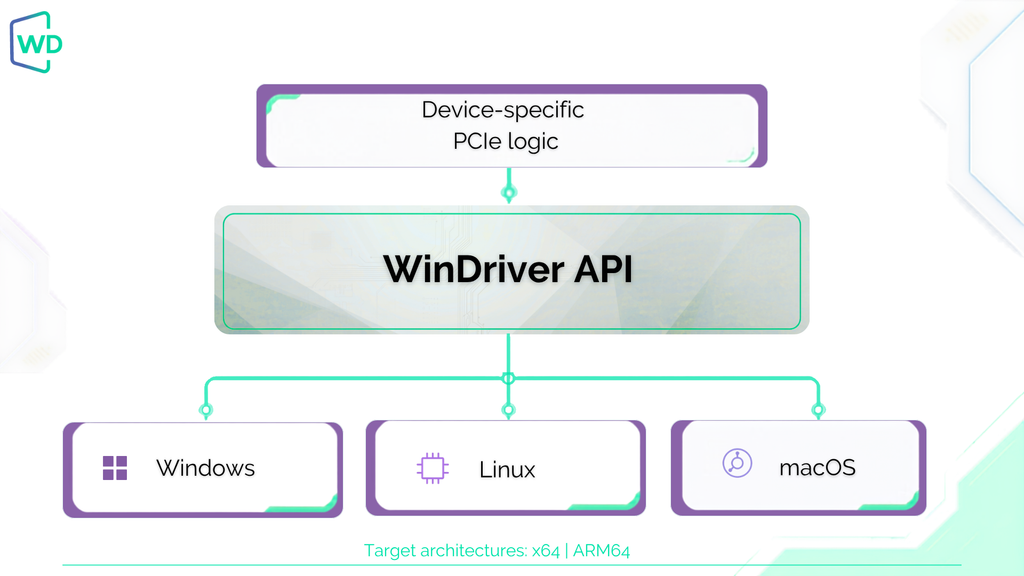
The device-specific code remains portable across supported platforms. Native C/C++ applications are compiled for each target, while higher-level languages such as Python can be moved between platforms without recompiling the application itself.

As a result, adding another supported platform does not require implementing the PCIe access layer again against a different native driver framework.

Moving from Windows to Linux ARM

Consider a PCIe card with a device driver developed for Windows x64. BAR-mapped registers control the device, DMA handles high-throughput data transfers, and MSI-X signals transfer completion.

The same board now needs to run on an ARM64 Linux target.

The device-side implementation remains applicable:

  • BAR layout and register offsets
  • Initialization sequence
  • DMA descriptor format
  • DMA engine programming
  • Interrupt status and acknowledgment logic

The target-specific work moves elsewhere.

The Linux ARM64 target still requires platform-specific build, deployment, and validation, particularly when working with custom kernels or vendor BSPs.

These platform requirements still need to be handled and tested, but the complete device-facing implementation does not need to be recreated for the new target.

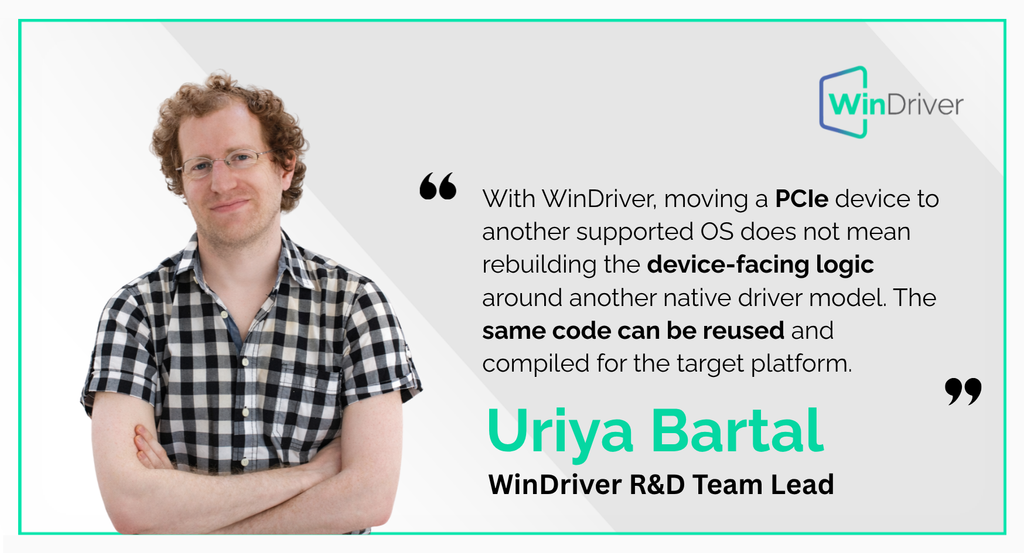
Uriya Bartal, WinDriver R&D Team Lead, puts this into practical terms:
Hardware bring-up across platforms

DriverWizard provides a direct way to inspect and validate a PCIe device before starting work on your driver.

Developers can enumerate the device, inspect PCI configuration space and resources, access BAR-mapped registers, test interrupts, and generate an initial code base using the WinDriver API.

For an FPGA or custom PCIe board, the workflow can start with the hardware itself:
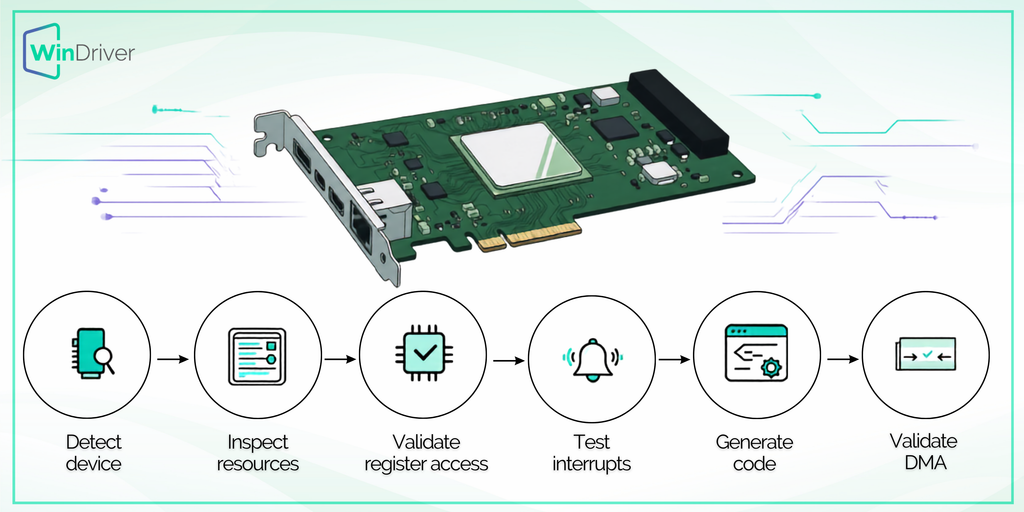
The same development model can then be used when bringing the device up on another supported platform.

This is particularly useful when hardware and software development run in parallel, while the FPGA register map, interrupt behavior, or DMA implementation is still evolving.

Kernel-level performance

Most PCIe device logic can start in user mode, where development and debugging are simpler than in kernel space.

WinDriver’s user-mode API supports register access, DMA setup, interrupt handling, and other device-control operations without requiring the device-specific implementation to run in the kernel.

For operations where interrupt latency, context-switch overhead, or execution timing becomes critical, WinDriver’s Kernel PlugIn provides an optional path for moving selected functionality into kernel space.eds efficient hardware access, but not a custom implementation of the entire operating-system driver stack.

Maintaining one PCIe codebase

Cross-platform requirements often appear after the first driver has already been developed.

🖥️ Windows x64 | Linux x64 | Linux ARM64 | custom BSP | macOS

A Windows x64 workstation may be the initial development target. A customer may later require Linux x64, an embedded deployment may introduce Linux ARM64 and a custom BSP, and another product environment may require macOS.

At this stage, each additional target becomes another implementation that has to stay aligned with the same hardware behavior.

The practical question is not whether each platform requires additional work. It does. The question is how much of that work belongs to the platform layer rather than the PCIe implementation.

Contact our team to discuss your cross-platform PCIe driver requirements.

Download WinDriver for free and start a 30-day trial.
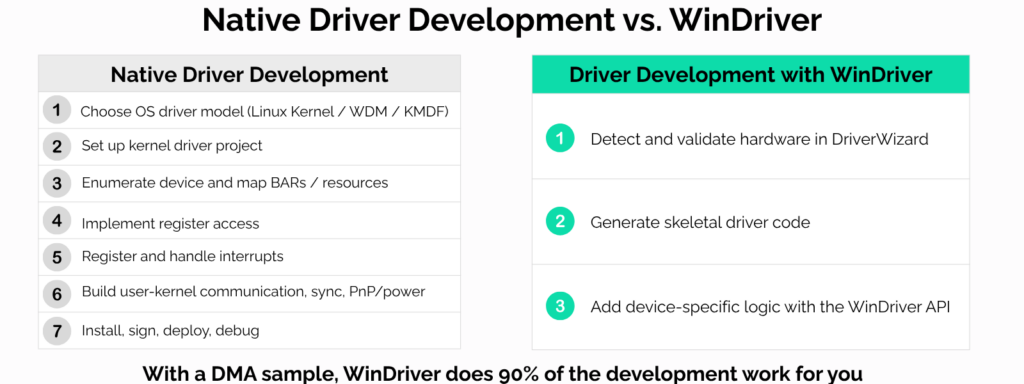
Do You Really Need to Write Your Own Driver? WinDriver vs. Native Driver Development

Developing a PCIe, PCI, SoC or USB device requires software that can enumerate the device, map hardware resources, handle interrupts, perform DMA, and expose a stable interface to the application.

The architectural choice is whether to implement that OS-specific driver layer directly, or use an existing driver framework and focus on the device-specific logic.

WinDriver follows the second model, and it eliminates the need for the user to work with kernel programming frameworks such as the Linux kernel, WDM, or KMDF on Windows. 

Native driver development

A native driver is implemented directly against the operating system’s driver model.

For a PCIe device, this typically includes:

  • device enumeration and BAR mapping
  • register access
  • interrupt registration and handling
  • DMA allocation and mapping
  • synchronization
  • user/kernel communication
  • device removal and power management
  • installation, signing, and deployment

This provides full control over the implementation, but the engineering team also owns the complete OS integration layer.

The WinDriver architecture

WinDriver provides the generic kernel-level infrastructure for hardware access and exposes it through a common API.

Applications can use WinDriver to access:

The hardware-specific implementation remains with the developer: register semantics, DMA descriptor formats, device protocols, and application behavior.

WinDriver abstracts the operating-system layer, not the device itself.

Hardware bring-up

With a native driver, basic OS integration often has to be implemented before BARs, registers, interrupts, or DMA can be tested reliably.

WinDriver’s DriverWizard allows developers to detect the device, inspect its resources, perform basic hardware access, test interrupts, and generate an initial code base.

For FPGA and PCIe projects, this can separate hardware validation from production software development while the register map or DMA engine is still evolving.

User mode, kernel mode, and performance

Most device-control logic does not necessarily need to run in kernel mode.

With WinDriver, register access, DMA setup, configuration, and application-level processing can remain in user space.

When latency-sensitive operations require kernel execution, WinDriver provides a Kernel Plugin mechanism so that only the critical path is moved into kernel mode.

A practical development model is:

  1. implement and validate the device
  2. measure throughput and latency
  3. identify the actual bottleneck
  4. move only the required operations into kernel mode

This keeps the kernel component small and avoids unnecessary kernel complexity.

DMA and interrupts

DMA and interrupt handling are typically among the most OS-specific parts of native driver development.

The operating system must manage DMA mappings, scatter-gather buffers, cache coherency, interrupt registration, synchronization, and cleanup.

WinDriver provides APIs for this infrastructure.

The developer still controls the device-specific behavior, such as:

  • programming DMA registers
  • building hardware descriptors
  • managing ring buffers
  • acknowledging interrupts
  • processing completion status

This reduces OS-specific implementation without hiding the hardware model.

Choosing between native development and WinDriver

A native driver is appropriate when the device requires direct integration with a specialized operating-system subsystem, unsupported kernel functionality, or complete ownership of the kernel implementation.

Examples may include storage, networking, graphics, audio, or other devices that must participate directly in a native OS stack.

WinDriver is better suited to custom hardware whose primary requirements are controlled access to registers, interrupts, and DMA.

Typical examples include:

  • FPGA-based SoC and PCIe boards
  • data-acquisition systems
  • instrumentation
  • industrial interfaces
  • custom accelerators
  • proprietary PCIe, SoC or USB devices

For these systems, the application usually needs efficient hardware access, but not a custom implementation of the entire operating-system driver stack.

Contact our team today to learn more about WinDriver.

Download WinDriver for free, and enjoy our 30-day trial.

AXI-DMA Performance Comparison Between Modes

The way DMA transfers are configured in software can have a significant impact on throughput.

WinDriver’s QA team tested several AXI-DMA configurations using the WinDriver AXI-DMA sample. The objective was to determine which software configuration delivers the best performance under the same hardware conditions.

The comparison focused on three variables:

  • Completion method: Polling vs. Interrupts
  • Descriptor configuration: Cyclic mode vs. Ping-pong mode
  • Driver implementation: Kernel PlugIn (KP) vs. No Kernel PlugIn (KP)

All tests were executed on the same machine to ensure a fair comparison.


Understanding the Test Configurations

ConfigurationDescription
KP | CyclicKernel PlugIn enabled with cyclic mode
KP | Ping-PongKernel PlugIn enabled with ping-pong mode
User-mode | CyclicUser-mode driver with cyclic mode
User-mode | Ping-PongUser-mode driver with ping-pong mode

Understanding Descriptor Modes

Cyclic Mode: In this mode, the DMA engine continuously cycles through a defined list of descriptors. Once the last descriptor in the chain is processed, the hardware automatically wraps back to the first one. This is ideal for continuous data streaming, as it allows the hardware to operate without needing software to restart the process for each buffer.

Ping-Pong Mode: In this mode, the DMA engine toggles between two dedicated buffer areas (the “ping” and “pong” buffers). While the hardware writes to or reads from one buffer, the software can simultaneously process or prepare the other. This double-buffering approach prevents data overwriting and ensures a continuous flow, though it requires more active software management to switch buffers after each transfer completes.

The Kernel PlugIn (KP) executes performance-critical operations in kernel space, reducing software overhead. The descriptor sets define how DMA transfer descriptors are managed, with cyclic and ping-pong modes determining how the hardware cycles through buffer descriptors.


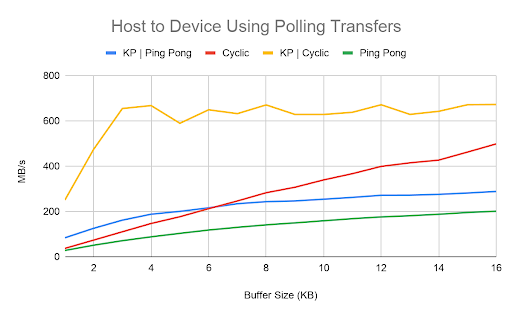
Test 1 – Host-to-Device Using Polling

The first test measures Host-to-Device transfers using polling as the completion method.

Several observations stand out:

  • Kernel PlugIn with cyclic mode consistently delivers the highest throughput.
  • Using cyclic mode significantly outperforms ping-pong mode.
  • Even without Kernel PlugIn, reducing descriptor overhead noticeably improves performance.

These results show that minimizing software overhead allows the DMA engine to dedicate more time to moving data instead of managing descriptors.

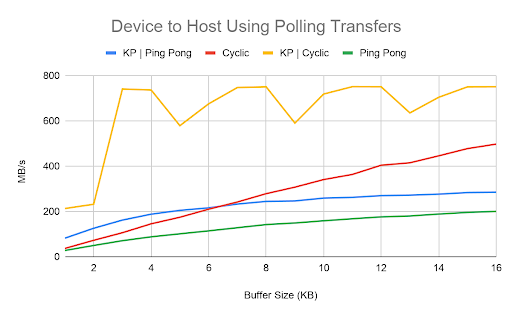
Test 2 – Device-to-Host Using Polling

The Device-to-Host polling benchmark follows the same pattern.

Again:

  • KP | Cyclic achieves the highest transfer rates.
  • Cyclic mode consistently outperforms ping-pong mode.
  • Throughput increases with larger buffer sizes before reaching a plateau.

The consistency between transmit and receive directions demonstrates that the performance gains are not workload-specific.


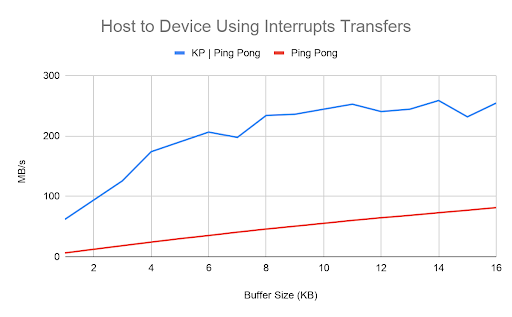
Test 3 – Host-to-Device Using Interrupts

Interrupt-based transfers show a different performance profile.

Compared to polling:

  • Overall throughput is lower.
  • Kernel PlugIn still provides a substantial improvement.
  • Interrupt handling introduces additional overhead that limits maximum bandwidth.

Interrupt mode remains valuable for applications where CPU efficiency and asynchronous operation are more important than absolute throughput.


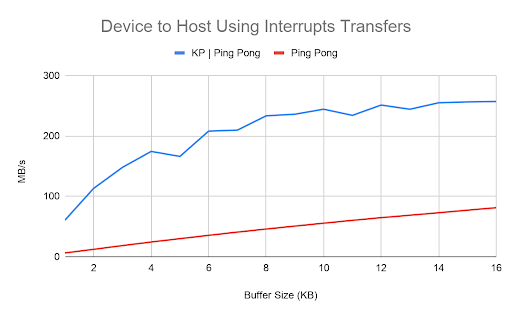
Test 4 – Device-to-Host Using Interrupts

The final test confirms the same trend for Device-to-Host transfers.

Kernel PlugIn continues to improve throughput, while interrupt processing limits peak bandwidth compared to polling.

Across all four tests, the observed behavior remains remarkably consistent.


Why Does Polling Perform Better?

DMA transfers move data independently of the CPU. However, once a transfer completes, the CPU must be notified.

There are two common completion methods:

  • Polling, where software continuously checks DMA status.
  • Interrupts, where the DMA engine signals the CPU when the transfer finishes.

Polling avoids interrupt generation, context switching, and interrupt service routine overhead. In the tested AXI-DMA implementation, ping-pong mode also requires maintaining two descriptor sets, adding further management overhead compared to the streamlined cyclic mode.


Key Takeaways

Our tests provide several practical recommendations for developers working with AXI-DMA:

  • Polling delivers the highest throughput when maximum transfer performance is the priority.
  • Cyclic mode performs better than ping-pong mode in polling mode.
  • Kernel PlugIn significantly improves performance across all tested scenarios.
  • 4-byte memory alignment remains an important optimization for efficient DMA transfers.

Conclusion

The results demonstrate that DMA performance depends not only on the hardware IP but also on driver architecture and software configuration.

For developers using WinDriver with AXI-DMA, selecting the appropriate completion method, minimizing descriptor overhead, and leveraging the Kernel PlugIn can provide measurable throughput improvements without requiring any hardware changes.

Boosting Driver Performance with Kernel Plugins

In today’s high-performance computing environments, even a small inefficiency in driver architecture can lead to major bottlenecks. For developers working with custom hardware and device drivers, Jungo’s WinDriver offers a unique approach to maximizing throughput and responsiveness via Kernel Plugins (KPs). This post walks you through what Kernel Plugins are, why you should use them, and how to get started building one using WinDriver’s tools.


🧠 What is a Kernel Plugin?

A Kernel Plugin (KP) is a block of code that runs in kernel mode, giving it direct access to hardware and low-level resources. Unlike standard user-mode drivers that must constantly switch between user and kernel mode, KPs handle time-sensitive tasks like interrupts and DMA transfers directly in the kernel, avoiding costly context switches.

This architectural shift results in major performance gains, especially in high-speed applications.


🚀 Why Use a Kernel Plugin?

Here’s why Kernel Plugins are worth your attention:

  • Speed: Handle 100,000+ interrupts per second without missing a beat.
  • Efficiency: Eliminates the back-and-forth between user and kernel mode.
  • Portability: Same KP source code works across Windows, Linux, and macOS.
  • Safety: Develop and test logic in user mode first, then port to kernel mode—reducing crash risk.

🧱 Kernel Plugin Architecture

A Kernel Plugin runs independently of the user application, though the two communicate via message passing and callback functions.

Key interactions include:

  • Driver load
  • Handle request
  • Message call
  • Interrupt handling

Tip: Use the high-level WDC_* API for most KP operations to simplify development and maintain portability.


🛠️ Building Your First Kernel Plugin

Follow these steps to get started:

  1. Use the PCI Diag Sample
    Located in the WinDriver installation folder, this is a fully working driver + KP example.
  2. Generate Your Driver
    Open the Driver Wizard GUI, scan your PCI device, and generate a new project. Enable the Kernel Plugin option during setup.
  3. Edit the Plugin Code
    The Wizard generates skeleton KP code. You’ll primarily edit kp_init, kp_call, and kp_int_handler.
  4. Message Passing
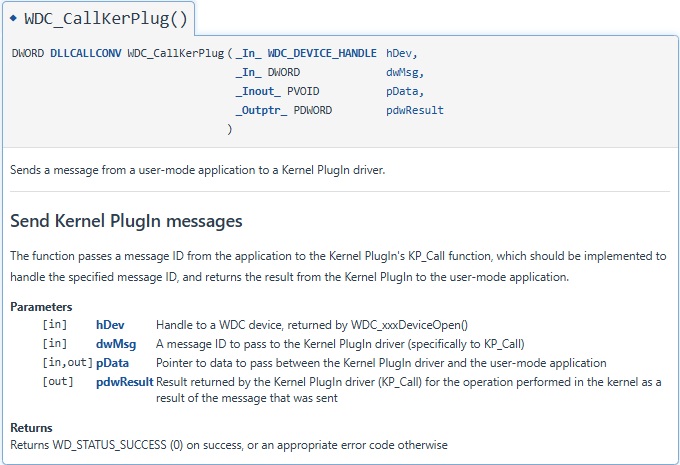
    Use WDC_CallKerPlug() in user mode to invoke your KP logic. Use shared headers to keep enums, struct names, and command codes synchronized between modes.

⚡ Interrupt Handling in Kernel Mode

Interrupts can overwhelm a user-mode driver. But in kernel mode:

  • You can process interrupts immediately.
  • Handle high IRQL tasks with minimal delay.
  • Offload lower-priority tasks using Deferred Procedure Calls (DPCs), keeping the system responsive.

Real-World Example

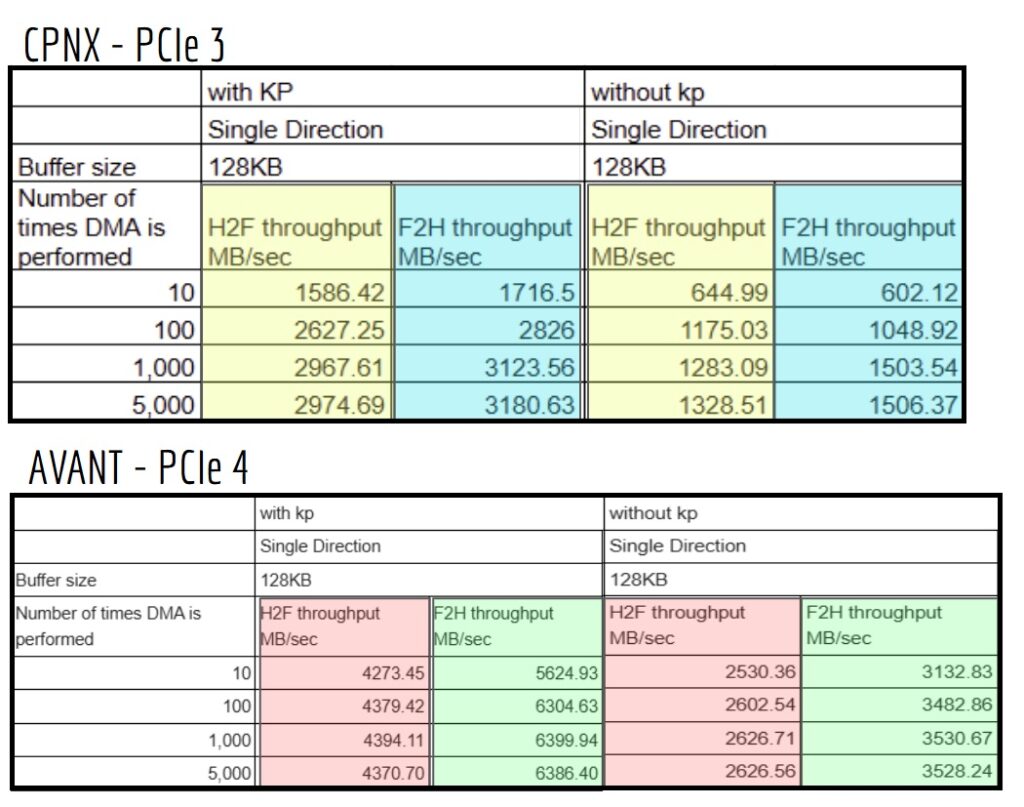
On Lattice’s CPNX and Avant FPGAs, switching to Kernel Plugin interrupt handling improved DMA throughput by over 100%.


✅ Best Practices

  • Develop in User Mode First
    Fully test and debug before moving any logic into the kernel.
  • Keep IRQL Sections Short
    Do the bare minimum in kpinthandler() and defer everything else.
  • Use Shared Headers
    Maintain one source of truth for constants, enums, and IOCTL codes across both layers.
  • Gradual Migration
    Don’t port everything at once. Move only critical functions into the KP.

Contact our team today to learn more about WinDriver.

Download WinDriver for free, and enjoy our 30-day trial.

PCI Diag: Explaining and Demonstrating PCI Diagnostic Tools

Simplifying PCI Diagnostics (Device Testing and Debugging with PCI Diag)

Simplifying PCI Diagnostics: Device Testing and Debugging with PCI Diag

The PCI Diagnostic Tool (PCI Diag) is a powerful utility designed to help developers test, debug, and interact with PCI devices efficiently. This fully functional sample application allows users to access and control devices without modifications, making it an essential resource for driver development and troubleshooting.

Supporting both Windows and Linux, PCI Diag facilitates seamless device detection, interrupt handling, and memory management. Additionally, it provides key insights into PCI configuration, Inter-Process Communication (IPC), and Direct Memory Access (DMA), helping developers validate and optimize their implementations. In this guide, we will explore its core features and functionalities in detail.

PCI Diagnostic Tools: Functions for PCI Device Interaction

Device Access & INF Files

  • Windows: Accessing PCI devices requires an INF file. The WinDriver suite includes the DriverWizard utility, which simplifies INF file creation. This tool detects device information, defines interrupt details, and generates skeletal diagnostics code, including interrupt routines.
  • Linux: INF files are not required, streamlining device access.

Debugging & Code Generation

  • PCI Diag assists developers in understanding API usage, interrupt handling, and licensing requirements.
  • It helps identify whether issues stem from the device or the code, reducing debugging time.
  • Sample code is available in C, .NET, Python, Java, and PowerShell, facilitating quick integration into various workflows.

Live Demo & Core Functionalities of PCI Diagnostics

Scanning PCI Devices

  • The tool scans PCI devices and retrieves crucial details such as vendor ID, device ID, memory addresses, and interrupt settings.

Inter-Process Communication (IPC)

  • PCI Diag enables multiple applications to share data from a PCI device, simplifying IPC management and improving performance.

Reading & Writing to PCI Configuration Space

  • Users can view configuration registers and read or write offsets directly within PCI Diag, eliminating the need for additional coding.
  • This feature makes device configuration adjustments quick and straightforward.

Checking Device Capabilities

  • PCI Diag identifies the types of interrupts a device supports, along with other key capabilities, helping developers optimize performance and ensure compatibility.

Memory & Buffer Management

  • Developers can allocate and free shared buffers for efficient inter-process communication.
  • The tool also supports DMA operations and scatter-gather memory allocation, ensuring smooth and efficient data transfers.

Troubleshooting PCI Diag Issues

PCI Diag is designed to work reliably across various PCs and PCI devices, making it an invaluable tool for testing and debugging.

Download WinDriver for free, and enjoy our 30-day trial.

Implementing DMA with WinDriver

The video provides a detailed guide on implementing Direct Memory Access (DMA) with WinDriver. It covers API usage, best practices, memory management, and interrupt handling. The emphasis is on using high-level APIs and the XDMA sample code to ensure efficiency and reliability.

Understanding Device Specifications

Before implementing a driver, users should thoroughly understand device specifications, offsets, and descriptor formats. For example, this is particularly relevant for Xilinx products. A proper grasp of the DMA start and completion mechanisms is also necessary for smooth implementation.

Key Topics Covered in the Video

The video offers a technical overview of DMA implementation using WinDriver, highlighting the following key aspects:

API Types in WinDriver

WinDriver provides two types of APIs:

  • High-level API (recommended): More advanced, easier to use, and operates in user mode.
  • Low-level API: Operates in kernel mode and requires more manual configuration.

Since the high-level API simplifies DMA handling, the focus remains on its functions, particularly WDC DMA scatter/gather buffer locking and unlocking, as well as interrupt handling.

Direct Memory Access Code Generation and Implementation

DMA implementation consists of several steps, including buffer allocation, locking, and closing the DMA process. To facilitate this, WinDriver provides APIs for:

  • Allocating memory
  • Transferring data
  • Managing interrupts

Users can specify key parameters, such as offsets, data to be transferred, and whether to use an interrupt handler.

Best Practices for DMA Implementation

For optimal DMA performance, follow these recommended steps:

  1. Allocate a user-mode buffer.
  2. Lock the buffer to ensure proper access control.
  3. Transfer data based on the required offsets.
  4. Close the DMA process after completion.

Additionally, scatter-gather DMA is a more advanced method that allows for efficient memory management.

Important Data Structures & Functions

The WDMA struct plays a crucial role in DMA handling, as it stores:

  • Buffer handles
  • User/kernel addresses
  • Buffer sizes
  • Alignment details

For reference, the XDMA sample code serves as an excellent template for building custom implementations.

Interrupt Handling vs. Polling Methods

DMA completion can be managed using two methods:

  • Polling Method: The system continuously checks for completion, which can be inefficient.
  • Interrupt Method (recommended): Uses an interrupt handler, which enhances efficiency.

By using the XDMA int enable function, users can configure interrupt handling in WinDriver for better performance.

CPU Cache Flushing for Direct Memory Access

Before and after a DMA transfer, it is essential to flush the CPU cache to prevent data corruption. This ensures clean data transfers and avoids inconsistencies.

Key functions that help with this process include:

  • DMA sync CPU
  • DMA sync I/O

Building a DMA Program

Once memory is allocated and locked, users must develop their own DMA program to manage data transfers. This program should clearly define:

  • What data needs to be transferred and where (specific offsets).
  • Whether to use an interrupt handler or polling for completion.
  • How to handle errors and logging during the transfer.

To simplify development, using the XDMA sample as a template is highly recommended.

By following these best practices and leveraging WinDriver’s high-level API, users can implement a robust and efficient DMA solution.

Please feel free to Contact our team today to learn more about WinDriver or Download WinDriver for free, and enjoy our 30-day trial.

SR-IOV for PCIe Devices

SR-IOV might sound like a Star Wars droid or a new pharmaceutical, but it actually stands for Single Root I/O Virtualization. This feature allows a single physical device to function as multiple virtual devices, improving both performance and efficiency. Many modern systems rely on SR-IOV, especially in networking (NICs), storage controllers, and GPUs. As a result, it has become essential for cloud computing, high-performance computing (HPC), and enterprise virtualization.

You’re probably familiar with virtual memory and virtual machines. These technologies support tasks like testing environments, multitasking, and system recovery. But what about virtual PCIe devices? Although they are not as well known, they play a crucial role in optimizing performance and resource allocation in today’s computing environments.

Why Does It Matter?

SR-IOV offers several key benefits:

  • Better Resource Utilization – A single physical device efficiently serves multiple virtual machines (VMs) or applications, reducing hardware costs.
  • Stronger Isolation & Security – Each virtual function operates independently, preventing interference between workloads and enhancing security in multi-tenant environments.
  • Greater Scalability – Virtual devices allow flexible scaling, making it possible to support more workloads without adding extra hardware.

How SR-IOV Works

WinDriver provides a special API for SR-IOV, which allows a Physical Function (PF) to create and manage Virtual Functions (VFs) using special registers. Here’s how the process works:

  1. By default, SR-IOV remains disabled, and the PF functions like a standard PCIe device.
  2. When enabled, the system assigns each VF a unique Routing ID (domain, bus, slot, and function number).
  3. Each VF operates independently and has its own PCI memory space for essential registers.
  4. A VF driver manages these registers, making the VF appear as a real PCIe device. As a result, virtual machines (VMs) and containers gain direct access to high-performance PCIe resources with minimal overhead.

For more details, refer to the official documentation:
🔗 SR-IOV Documentation

Drivers for PCIe-Powered AI Infrastructure

ai infrastructure

PCI devices, including AI accelerators, contribute significantly to the development and adoption of AI technologies. The PCIe interface provides high-speed bandwidth for efficient data transfers. When combined with AI computing power, the potential for innovation and development is limitless. In these kinds of platforms, the design must tackle bottlenecks and exhaustive processes.

Enhancing AI Infrastructure and Application Drivers

Developers must take a holistic approach to system optimization. Ensuring seamless integration across hardware, software, and infrastructure is key to delivering high-performance AI at the edge. This includes:

  • System Optimization: Optimize hardware, software, and infrastructure to avoid bottlenecks and manage large data volumes efficiently.
  • Appropriate Hardware: Choose accelerators and components that align with specific workload demands for optimal performance.
  • Robust Data Pipelines: Design data workflows that can handle continuous and large-scale data processing.
  • Ensuring Driver Compatibility: Use optimized drivers to facilitate smooth integration and ensure systems can meet the demands of AI workloads and peripherals.

The driver plays a crucial role in the system architecture. A well-designed driver alleviates the workload and minimizes points of interaction. In critical operations such as real-time AI performance analysis or time-sensitive tasks, an efficient driver can be the determining factor between success and failure.

Here are a few key steps to enhance your driver’s impact on AI performance:

Implementing Direct Memory Access (DMA): Our first step is to ensure that data flows through as few channels as possible. For example, using Direct Memory Access (DMA) allows data to transfer with little to no involvement from the CPU. This reduces the CPU’s workload and significantly improves transfer speed.

Using DMA with the Interrupt Method: With interrupt-driven Direct Memory Access, the CPU is only notified when the data transfer is complete or when an issue occurs. The DMA controller manages data transfer between the peripheral and memory, while the CPU remains free to perform other tasks. Once the transfer is finished, the DMA prompts the CPU to handle any post-transfer operations. This approach minimizes CPU involvement during the transfer, improving overall system efficiency while ensuring timely updates when the process concludes.

Creating a Shared DMA Buffer: Using a shared buffer speeds up data movement and reduces latency. This approach not only accelerates data movement but also enables seamless, low-latency access for critical components and peripherals across multiple processes. In complex systems where scalability and adaptability are paramount, expediting data transfer through DMA buffers is critical for overall system performance

Simplifying the Driver Development Process

Driver development can be just as complex as building AI infrastructure. It involves integrating hardware, software, and memory management for seamless operation. WinDriver simplifies this process by offering a comprehensive toolkit that developers can use to streamline driver development. This toolkit includes everything you need to create optimized drivers without dealing with the complexities of low-level system operations streamlining and accelerating the development process.

Key Features of WinDriver

  • DMA Support: WinDriver includes a robust DMA mechanism that supports both Scatter-Gather and Contiguous DMA operations. It ensures efficient memory management and optimal system performance by allocating, locking, and releasing memory automatically.
  • Interrupt Handler Functions: WinDriver provides powerful interrupt handler functions, making it easier to manage various interrupt types. It includes sample implementations to handle the listening, acknowledgment, callback/transfer commands, and efficiently closing the interrupt handing process.
  • DMA Shared Buffer: WinDriver supports the sharing of buffers, including contiguous DMA and kernel buffers between multiple processes. This eliminates unnecessary buffer copying, improves data transfer efficiency, and makes inter-process communication (IPC) more reliable.

If you’d like to preview any of the above features please feel free to register for a free trial period.

Compatible ARM Drivers

ARM processors have become increasingly popular among PCIe and USB developers. Their energy efficiency, scalability, and high performance in compact designs drive adoption. The rise of Windows on ARM amplifies this trend. However, challenges like software optimization and legacy support remain key considerations in PCIe and USB development, especially within the context of ARM drivers.

  • Benefits of ARM:
    • Energy efficiency.
    • Scalability for various devices.
    • High performance in compact designs.
  • Challenges:
    • Software optimization.
    • Legacy system support.

Binaries built for x86/x64 systems cannot be reused on ARM architectures. They require recompilation or translation tools for compatibility.

Streamlining ARM Driver Development with WinDriver

WinDriver simplifies the process of developing Windows on ARM drivers. Its features ensure ARM-native compilation for both Windows and Linux platforms.

  • Key Features:
    • No-code CMake generation automatically configures drivers.
    • Dedicated ARM libraries optimize driver settings.
    • Pre-configured settings eliminate manual configuration.

WinDriver’s tools make driver development efficient and seamless.

Critical Factors When Migrating Drivers to ARM Architecture

Migrating to ARM architecture requires addressing major differences between x64 and ARM development. These differences stem from their architecture and design philosophies.

  • Key Considerations:
    • Differences in instruction sets.
    • Memory alignment requirements.
    • Compiler optimizations.
    • Cross-compilation for target devices.
  • Legacy Support Challenges:
    • Compatibility with x64 applications and hardware interfaces like PCIe and USB.

Binaries built for x86/x64 systems cannot be reused on ARM architectures. They require recompilation or translation tools for compatibility.

Bridging the Gap: Ensuring Compatibility Between x86 and ARM Architectures

Compatibility with legacy x86 applications remains a critical challenge as the industry transitions to ARM-based architectures.

  • Translation Tools:
    • Rosetta: Developed by Apple, it enables x86-64 applications to run on ARM-based macOS systems by dynamically translating binary instructions. This ensures that users can seamlessly run legacy applications on Apple Silicon devices without recompilation, albeit with some performance overhead.
    • Windows-on-Windows 64-bit (sysWoW64): Facilitates x86 applications on Windows systems, including ARM-based devices. It handles instruction translation and API redirection, allowing older or incompatible software to function within a modern ARM-native environment.

These tools offer both benefits and drawbacks:

  • Advantages:
    • Seamless operation of legacy applications.
    • Mitigation of compatibility concerns.
  • Disadvantages:
    • Performance overhead due to dynamic translation.
    • Limited hardware utilization compared to native ARM applications.

While these tools can be effective in some contexts, they rely on additional reading and writing operations to dynamically translate instructions from x86 to ARM. This results in increased latency and computational load and can lead to slower application performance compared to running native ARM applications, especially in resource-intensive tasks. The added layer of instruction translation prevents these tools from fully leveraging the efficiency and speed of ARM’s architecture, making them a stopgap solution rather than a long-term replacement for native software optimization.

Cross-Compiling and Native-ARM Applications Essentials

Compiling for native ARM architecture involves tailoring essential settings for ARM platforms.

  • Using GCC:
    • Specify target architecture with flags and enable optimizations with -O levels to maximize performance.
    • Cross-compilation often involves using toolchains like arm-none-eabi-gcc.
    • Configure -mcpu or -mfpu flags for processor-specific optimizations.
  • Using Visual Studio:
    • Select ARM/ARM64 in project settings and configuring the toolset to use the appropriate ARM compiler and linker
    • Adjust build configurations to enable optimization features like SIMD extensions and verify dependencies and libraries for ARM compatibility
    • Properly defines the settings and ensures efficient, high-performance binaries tailored for the ARM architecture.

WinDriver contributes the following:

  • CMake Generation:
    • One-click generation for Windows and Linux environments.
    • Ensures that the generated CMake files are compatible with ARM architectures.
    • Simplifies the process of compiling applications for both Windows and Linux with minimal configuration, enhancing the workflow for cross-platform development.
  • Dedicated ARM Libraries:
    • Pre-configured compilation flags.
    • Adjusted API for ARM architecture.
    • Efficient compilation without needing to manually adjust toolchain settings

Effortless ARM-Native Kernel Plugin Generation with WinDriver

Kernel plugins enhance OS kernel functionality by interacting directly with hardware or providing system-level services. The kernel plugin, typically an independent .sys file, operates separately from the main driver application. This modular design enables independent functionality while integrating with the driver and OS kernel. For ARM platforms, the plugin must be compiled as ARM-native code to ensure compatibility and optimal performance. An x86/x64-compiled plugin cannot function on ARM systems due to differences in instruction sets and architecture.

  • Advantages of Kernel Plugins:
    • Faster communication between hardware and the OS.
    • Reduces the overhead of user-space operations resulting in lower latency and better resource management.
    • Better resource management, and overall enhanced system performance, particularly in high-throughput or time-sensitive applications.

In order to streamline Kernel Plugin Development, WinDriver offers the following features:

  • No-Code CMake Generation:
    • Automatically generates ARM-native kernel plugins.
    • Fully configured for both Windows and Linux.
  • Dedicated Libraries:
    • Pre-configured ARM-specific flags and optimizations.
    • Adjusted APIs for seamless ARM integration.

WinDriver eliminates the need for manual configuration, enabling users to quickly and easily generate a kernel plugin optimized for ARM without writing any code.

If you’d like to preview any of the above features please feel free to register for a free trial period

FPGAs: The Secret Weapon Powering Next-Generation Cars

In the automotive industry, the pursuit of innovation is perpetual, underscored by the relentless evolution of technology, shifting consumer demands, and stringent regulatory standards. Amidst this dynamic landscape, the challenges confronting automakers are manifold, necessitating sophisticated solutions to navigate the complexities of modern vehicle design and functionality. At the forefront of this endeavor lies the indispensable role of Field-Programmable Gate Arrays (FPGAs), heralded as pivotal enablers in addressing some of the most pressing challenges faced by the automotive sector.

Adapting to Change with Agility and Efficiency

At the core of today’s automotive landscape lies the essential need for connectivity. Modern vehicles have transcended their traditional roles, evolving into interconnected ecosystems with digital systems and functionalities. However, orchestrating seamless communication among these varying components presents a formidable challenge. FPGAs, renowned for their unparalleled flexibility and adaptability, emerge as instrumental facilitators in ensuring cohesive integration and interoperability across diverse automotive systems, from infotainment and navigation to telematics and vehicle-to-everything (V2X) communication.

Alongside connectivity, automotive systems must exhibit robustness and resilience to withstand the rigors of real-world driving conditions. The demands placed on vehicular systems are demanding, encompassing extreme temperatures, mechanical vibrations, and electromagnetic interference. FPGAs are revered for their inherent robustness and reliability, capable of enduring the harshest environmental conditions while maintaining optimal performance. In safety-critical applications such as autonomous driving and advanced driver assistance systems (ADAS), the dependability of FPGAs is indispensable, safeguarding vehicle occupants and ensuring operational integrity.

Furthermore, the automotive industry experiences constant change, marked by evolving consumer preferences, emerging technologies, and regulatory requirements. To navigate this dynamic terrain, automakers must exhibit agility and adaptability, swiftly responding to market dynamics and technological advancements. FPGAs, characterized by their rapid reconfigurability and scalability, empower automakers to iterate and innovate expeditiously, ensuring alignment with evolving market demands and regulatory mandates.

Moreover, the imperative of energy efficiency and sustainability looms large in the automotive sector, necessitating judicious management of power consumption and data processing. FPGAs emerge as exemplars of efficiency, combining high-performance computing capabilities with minimal power consumption. Whether optimizing power management systems or processing sensor data in real-time, FPGAs epitomize the convergence of performance and efficiency, supporting the industry’s transition towards sustainable mobility solutions.

FPGAs: Shaping the Future of Mobility

FPGAs epitomize a paradigm of innovation and resilience within the automotive sector, underpinning the development of next-generation vehicles equipped to meet the demands of an increasingly interconnected and dynamic world. As the automotive industry continues to evolve, FPGAs will remain indispensable allies, driving advancements in connectivity, robustness, agility, and efficiency, and shaping the future of mobility for generations to come.

Effective driver development is crucial in the automotive industry as it directly impacts vehicle systems’ performance, reliability, and functionality. Drivers interface hardware devices, such as FPGAs, and the operating system, enabling seamless communication and control. A well-designed driver ensures optimal system operation, enhances safety, and facilitates the integration of new features and technologies. Additionally, efficient driver development streamlines the overall development process, reducing time-to-market and costs while enabling automakers to stay competitive in a rapidly evolving market.

Optimizing FPGAs: Why Driver Development Matters

Jungo’s WinDriver toolkit offers a comprehensive solution for driver development, significantly improving the efficiency, effectiveness, and cost-effectiveness of FPGA driver development. By providing a robust set of tools and resources, WinDriver simplifies the complexities of driver development, empowering developers to focus on innovation rather than mundane implementation details. WinDriver accelerates the development cycle, including automatic code generation, debugging tools, and built-in support for industry-standard protocols, ensuring compatibility and reliability across diverse automotive applications. 

By leveraging Jungo’s WinDriver toolkit, automakers can streamline driver development processes, reduce development costs, and accelerate time-to-market for innovative automotive solutions, thereby gaining a competitive edge in the fast-paced automotive industry landscape.

Ready to learn more about how FPGAs can revolutionize your automotive designs? Contact us today!

WinDriver Download Free 30 Day Trial

Software License Agreement of WinDriver (TM) Version v16.6.0
© Jungo Connectivity Ltd. 2024 All Rights Reserved

IMPORTANT – READ CAREFULLY: THIS SOFTWARE LICENSE AGREEMENT (“AGREEMENT”) IS A LEGAL AGREEMENT BETWEEN YOU AND JUNGO CONNECTIVITY LTD. (“JUNGO”), FOR THE WINDRIVER SOFTWARE PRODUCT ACCOMPANYING THIS LICENSE (THE “SOFTWARE”). BY INSTALLING, COPYING OR OTHERWISE USING THE SOFTWARE, YOU AGREE TO BE LEGALLY BOUND BY THE TERMS AND CONDITIONS OF THIS AGREEMENT. IF YOU DO NOT AGREE TO THE TERMS AND CONDITIONS OF THIS AGREEMENT, DO NOT INSTALL, COPY, OR OTHERWISE USE THE SOFTWARE.


  1. OWNERSHIP OF THE SOFTWARE. All right, title, and interest in and to the Software, including associated intellectual property rights, of any sort and/or kind, are and shall remain solely with Jungo and its licensors, and may be protected by copyright, trademark, patent and trade secret law and international treaties. This Agreement does not convey to you an interest in or to the Software, but only a limited, non-transferable, non-sublicensable, non-exclusive, and revocable right of use, in accordance with the terms of this Agreement. You may not remove any proprietary notices and/or any legends from the Software, in whole or in part.


  1. GRANT OF LICENSE. Jungo hereby grants you a personal, non-exclusive, nontransferable, non-sublicensable node-locked and time limited license to use the Software.


    – Individuals: Jungo grants you, as an individual, a personal, non-exclusive, “single-user” license to use the Software on a single computer, in the manner provided below, at the site for which the license was given.


    – Entities: If you are an entity, Jungo grants you the right to designate one individual within your organization (and only one) to have the right to use the Software on a single computer, in the manner provided below, at the site for which the license was given.


    – License Scope: A single user license allows usage of WinDriver and redistribution of certain components (as defined below) within a single end product SKU, for a single device (identified by its VID/PID (USB) or VID/DID (PCI)), and without SDK/API capabilities.  If you need extended license or distribution rights, please contact Jungo.


  1. EVALUATION LICENSE. If you have not yet paid license fees for the use of the Software, then Jungo hereby grants you a personal, non-exclusive, non-transferable and non-sublicensable license to internally use the Software for evaluation purposes only, for a period of 30 days (the “Evaluation License”). If, after the expiration of the Evaluation License, you wish to continue using the Software and accompanying written materials, you may do so by remitting the required payment to Jungo, and you will then receive a registration code and a license string that will permit you to use the Software on a single computer under one of the license schemes specified in Section 2 above.


  1. SERVICE OPTIMIZATION AND ENHANCEMENT. To continuously improve and optimize Jungo’s services, Jungo reserves the right to anonymously monitor, collect, and analyze usage data, including but not limited to API interactions, performance metrics, and system activity. Such data collection and analysis shall be conducted in compliance with all applicable laws and regulations and shall be used solely for the purpose of enhancing service performance, security, and reliability.
  2. SUBSCRIPTION, SERVICE CONTINUITY, RENEWAL, AND LATE PAYMENT PENALTIES. Access to the WinDriver and its associated features is provided on a subscription basis, subject to annual renewal. Failure to renew the subscription before the expiration date may result in the automatic termination of access to the platform and all related services, and additional fees (including but not limited to late payment penalties, administrative charges, or reinstatement costs). Upon termination, the user shall forfeit any rights to continued use, and we reserve the right to suspend or delete any associated accounts, data, or functionalities without further notice.


  1. OPEN SOURCE. The Software includes certain files that are subject to open source licenses. These files are identified in their header files (“Open Source Files”). You must use the Open Source Files in accordance with the terms of their respective licenses.  In the event of any contradiction between the terms of this Agreement, and the terms of the open source license accompanying a certain Open Source File, the terms of the latter shall prevail, with regard to the said Open Source File.


RESTRICTIONS ON USE AND TRANSFER


  1. DISTRIBUTION OF FILES.


    (a) You may not distribute, or otherwise transfer or assign, any portion of the Software, including any of the headers or source files that are included in the Software, unless otherwise expressly permitted in this Agreement, subject to the provisions of Section 4 above.


    (b) Subject to your full and continued compliance with the terms of this Agreement, including the ongoing payment of annual license fees, you may distribute the following files:


Windows:
– windrvr1650.sys
– windrvr1650_legacy.sys
– windrvr1650.inf
windrvr1650.cat
– wdapi1650.dll
– wdapi1650_32.dll
– wdapi1650_arm64.dll
– wdapi_dotnet1650.dll
– wdapi_dotnet1650_32.dll
– wdapi_netcore1650.dll
– wdapi_java1650.dll
– wdapi_java1650.jar
– wdreg.exe
– difxapi.dll
– devcon.exe

Linux:
– windrvr_gcc_v3.o_shipped
– windrvr_gcc_v3_regparm.o_shipped
– kp_linux_gcc_v3.o
– kp_linux_gcc_v3_regparm.o
– libwdapi1650.so libwdapi1650_32.so
– libwdapi_java1650.so
– libwdapi_java1650_32.so
– wdapi_java1650.jar
– wdapi_netcore1650.dll
– kp_wdapi1650_gcc_v3.o_shipped
– kp_wdapi1650_gcc_v3_regparm.o_shipped
– linux_wrappers.c
– linux_wrappers.h
– wdusb_linux.c
– wdusb_interface.h
– wd_ver.h
– linux_common.h
– windrvr.h
– windrvr_usb.h
– wdsriov_interface.h
– wdsriov_linux.c
– wdreg
– configure makefile.in
– configure.wd makefile.wd.in
makefile.wd.kbuild.in
– configure.usb
makefile.usb.in
makefile.usb.kbuild.in
– setup_inst_dir

macOS:
– libwdapi1650.dyld
– libwdapi_java1650.jar
– libwdapi_java1650.dyld
– wdapi_netcore1650.dll
– WinDriver1650.kext
– WinDriver1650.dext
– wd_mac_install.sh
– wd_mac_uninstall.sh


    (c) The files listed in Section 5.b above may be distributed only as part of a complete application that you distribute under your organization name, and only if they significantly contribute to the functionality of your application. For avoidance of doubt, each organization distributing these files as part of the organization products is required to have valid license(s) under the organization name/VID, irrespective of the party who actually performed the product development. Licenses granted to subcontractors do not grant distribution or other rights to the organizations for which they are developing.


    (d) The distribution of the windrvr.h header file is permitted only on Linux.


    (e) You may not modify the distributed files specified in Section 5.b of this Agreement.


    (f) You may not distribute any header file that describes the WinDriver functions, or functions that call the WinDriver functions and have the same basic functionality as that of the WinDriver functions.


  1. The Software may not be used to develop a development product, an API, or any products, which will eventually be part of a development product or environment, without the written consent of Jungo and subject to additional fees and licensing terms.


  1. You may make printed copies of the written materials accompanying the Software, provided that only users bound by this license use them.


  1. You may not allow any third party to use the Software, grant access to the Software (or any portion thereof) to any third party, or otherwise make any commercial use of the Software, including without limitation, assign, distribute, sublicense, transfer, pledge, lease, rent, or share your rights in the Software or any of your rights under this Agreement, all whether or not for any consideration.


  1. You may not translate, reverse engineer, decompile, disassemble, reproduce, duplicate, copy, or otherwise disseminate all or any part of the Software, or extract source code from the object code of the Software.


  1. Jungo reserves the right to revise, update, change, modify, add to, supplement, or delete any and all terms of this License Agreement; provided, however, that changes to this License Agreement will not be applied retroactively. Such changes will be effective with or without prior notice to you. You can review the most current version of this License Agreement under the WinDriver download form page.


  1. You may not incorporate or link any open source software with any open source software part of the Software, or otherwise take any action which may cause the Software or any portion thereof to be subjected to the terms of the Free Software Foundation’s General Public License (GPL) or Lesser General Public License (LGPL), or of any other open source code license.


  1. DISCLAIMER OF WARRANTY. THIS SOFTWARE AND ITS ACCOMPANYING WRITTEN MATERIALS ARE PROVIDED BY JUNGO “AS IS” WITHOUT ANY WARRANTY. ANY EXPRESS OR IMPLIED WARRANTIES, INCLUDING, BUT NOT LIMITED TO, THE IMPLIED WARRANTIES OF MERCHANTABILITY, FITNESS FOR A PARTICULAR PURPOSE, AND NON-INFRINGEMENT, ARE HEREBY DISCLAIMED TO THE FULLEST EXTENT PERMITTED UNDER APPLICABLE LAW.


  1. NO LIABILITY. TO THE FULLEST EXTENT PERMITTED BY APPLICABLE LAW, IN NO EVENT SHALL JUNGO OR ITS LICENSORS BE LIABLE FOR ANY DIRECT, INDIRECT, INCIDENTAL, SPECIAL, EXEMPLARY, OR CONSEQUENTIAL DAMAGES (INCLUDING, BUT NOT LIMITED TO, PROCUREMENT OF SUBSTITUTE GOODS OR SERVICES; LOSS OF USE, DATA, SAVINGS, IP INFRINGEMENT OR PROFITS; OR BUSINESS INTERRUPTION) HOWEVER CAUSED AND ON ANY THEORY OF LIABILITY, WHETHER IN CONTRACT, STRICT LIABILITY, OR TORT (INCLUDING NEGLIGENCE OR OTHERWISE) ARISING IN ANY WAY OUT OF THE USE OF THIS SOFTWARE, EVEN IF ADVISED OF THE POSSIBILITY OF SUCH DAMAGE.


  1. Governing Law. This Agreement and use of the Software are governed by the laws of the State of Israel, regardless of its conflict of laws rules, and the competent courts of the State of Israel shall have sole and exclusive jurisdiction over any dispute under this Agreement or otherwise related to the Software.


  1. Confidentiality. The Software, including any additional information related thereto, contains confidential and proprietary information of Jungo.  Accordingly, you agree that you will not, nor allow any third party to, disseminate, transfer, grant access to, or otherwise disclose to any third party the Software or any part thereof or any other confidential or proprietary information of Jungo provided in connection therewith. You will maintain all copies of the Software and all related documentation in confidence.


  1. Termination and Effects of Termination. Jungo may terminate this Agreement and the licenses granted to you hereunder at any time if you breach any of your obligations hereunder, by issuance of written notice to such effect, addressed to you at the address you provided in your registration form. Upon expiration or other termination of this Agreement, the Licenses granted to you hereunder shall immediately and automatically be canceled, and you will immediately remove all copies of the Software from your computer(s) and cease any use thereof.


  1. Contact Details. If you have any questions concerning this Agreement or wish to contact Jungo for any reason —


          Web site: https://www.jungo.com

          Email:    [email protected]


  1. US GOVERNMENT RESTRICTED RIGHTS. The Software and documentation are provided with RESTRICTED RIGHTS.

  Use, duplication, or disclosure by the Government is subject to restrictions set forth in subparagraph (c)(1) of The Rights in Technical Data and Computer Software clause at DFARS 252.227-7013 or subparagraphs (c)(1)(ii) and (2) of Commercial Computer Software – Restricted Rights at 48 CFR 52.227-19, as applicable.


  1. Automatic Renewal. The subscription shall be automatically renewed, unless Licensee notifies Licensor 30 days or more prior to the expiration date of the subscription, of its intent not to renew the subscription.

Accessibility Toolbar