
Do You Really Need to Write Your Own Driver? WinDriver vs. Native Driver Development
Developing a PCIe, PCI, SoC or USB device requires software that can enumerate the device, map hardware resources, handle interrupts, perform DMA, and expose a stable interface to the application.
The architectural choice is whether to implement that OS-specific driver layer directly, or use an existing driver framework and focus on the device-specific logic.
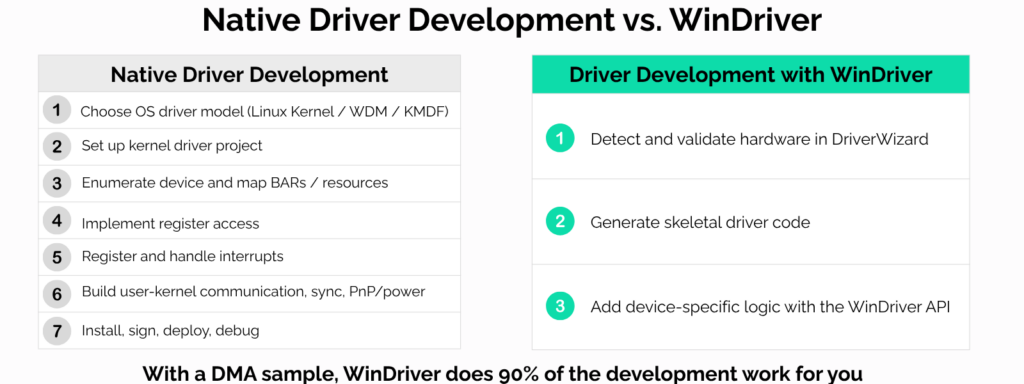
WinDriver follows the second model, and it eliminates the need for the user to work with kernel programming frameworks such as the Linux kernel, WDM, or KMDF on Windows.
Native driver development
A native driver is implemented directly against the operating system’s driver model.
For a PCIe device, this typically includes:
- device enumeration and BAR mapping
- register access
- interrupt registration and handling
- DMA allocation and mapping
- synchronization
- user/kernel communication
- device removal and power management
- installation, signing, and deployment
This provides full control over the implementation, but the engineering team also owns the complete OS integration layer.
The WinDriver architecture
WinDriver provides the generic kernel-level infrastructure for hardware access and exposes it through a common API.
Applications can use WinDriver to access:
- memory and I/O resources
- PCI configuration space
- interrupts
- DMA buffers and transfers
- device insertion and removal events
The hardware-specific implementation remains with the developer: register semantics, DMA descriptor formats, device protocols, and application behavior.
WinDriver abstracts the operating-system layer, not the device itself.
Hardware bring-up
With a native driver, basic OS integration often has to be implemented before BARs, registers, interrupts, or DMA can be tested reliably.
WinDriver’s DriverWizard allows developers to detect the device, inspect its resources, perform basic hardware access, test interrupts, and generate an initial code base.
For FPGA and PCIe projects, this can separate hardware validation from production software development while the register map or DMA engine is still evolving.
User mode, kernel mode, and performance
Most device-control logic does not necessarily need to run in kernel mode.
With WinDriver, register access, DMA setup, configuration, and application-level processing can remain in user space.
When latency-sensitive operations require kernel execution, WinDriver provides a Kernel Plugin mechanism so that only the critical path is moved into kernel mode.
A practical development model is:
- implement and validate the device
- measure throughput and latency
- identify the actual bottleneck
- move only the required operations into kernel mode
This keeps the kernel component small and avoids unnecessary kernel complexity.
DMA and interrupts
DMA and interrupt handling are typically among the most OS-specific parts of native driver development.
The operating system must manage DMA mappings, scatter-gather buffers, cache coherency, interrupt registration, synchronization, and cleanup.
WinDriver provides APIs for this infrastructure.
The developer still controls the device-specific behavior, such as:
- programming DMA registers
- building hardware descriptors
- managing ring buffers
- acknowledging interrupts
- processing completion status
This reduces OS-specific implementation without hiding the hardware model.
Choosing between native development and WinDriver
A native driver is appropriate when the device requires direct integration with a specialized operating-system subsystem, unsupported kernel functionality, or complete ownership of the kernel implementation.
Examples may include storage, networking, graphics, audio, or other devices that must participate directly in a native OS stack.
WinDriver is better suited to custom hardware whose primary requirements are controlled access to registers, interrupts, and DMA.
Typical examples include:
- FPGA-based SoC and PCIe boards
- data-acquisition systems
- instrumentation
- industrial interfaces
- custom accelerators
- proprietary PCIe, SoC or USB devices
For these systems, the application usually needs efficient hardware access, but not a custom implementation of the entire operating-system driver stack.
Contact our team today to learn more about WinDriver.
Download WinDriver for free, and enjoy our 30-day trial.